This academic project is a web-scraping agent that accepts a natural-language task and collects structured data from public websites.
The project shows how an AI agent can browse the internet, interact with web pages, and return useful information in a structured format.
Project Purpose
The purpose of this project is to automate the collection of public web data. The agent can start from a URL or search for relevant pages, interact with them, extract information, and validate the final result.
It works only with public pages. It does not support authentication, CAPTCHA solving, access-control bypass, or anti-bot circumvention. It also uses limits for steps, pages, retries, and execution time.
How the Workflow Works
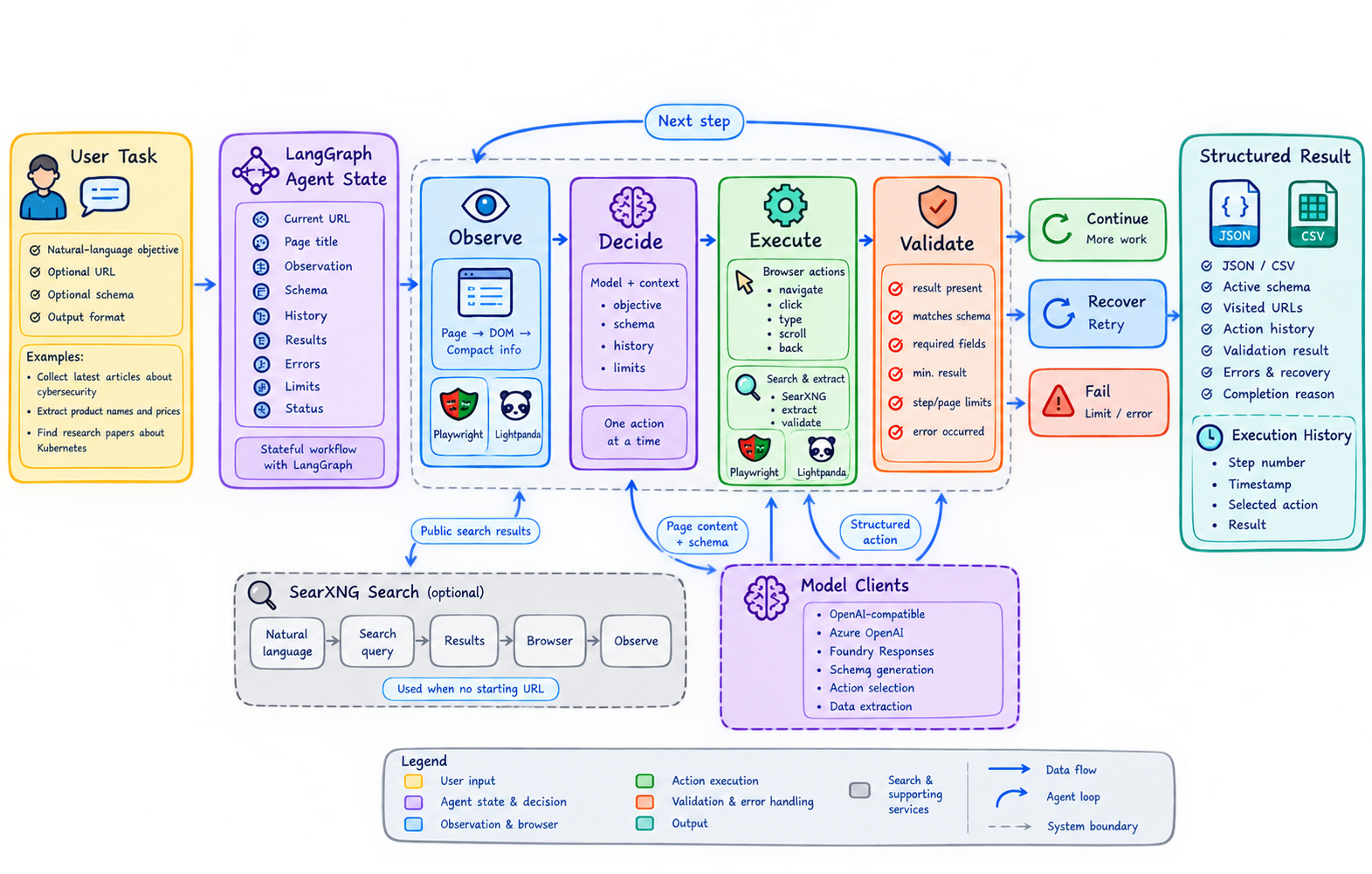
The agent follows a simple cycle: it observes the page, chooses one action, executes it through the browser, and validates the result. The workflow can continue, recover from an error, finish, or fail depending on the result and the execution limits.
The agent records its actions, observations, errors, and validation results. This makes the process easier to understand and debug.
What Is LangGraph?
LangGraph is a framework for building stateful workflows for AI agents. It connects steps as nodes and controls how the agent moves between them. In this project, its purpose is to keep the scraping process organized, visible, and able to continue or recover based on the current state.
Browser Automation
The project uses Playwright to control a browser through the Chrome DevTools Protocol (CDP), with Lightpanda as the browser runtime. The browser adapter can take page snapshots and perform actions such as navigation, clicking, typing, and scrolling.
The agent creates a compact observation instead of sending the complete page structure to the model. This observation includes the current URL, page title, useful visible text, and interactive elements with temporary IDs. It gives the model the information it needs to choose the next action.
Structured Data and Validation
The model returns one structured action at each step. Available actions include search, navigate, click, type, scroll, extract, back, finish, and fail.
Extracted records are validated with Pydantic. A schema can be supplied by the user or generated by the model before extraction. JSON is the main result format, and CSV can be created when the data is tabular. Invalid records are not silently accepted as successful results.
Recovery and Safety
Web pages can change or an action can fail. When this happens, the agent records the error, takes a new observation when possible, and can choose another action.
The project uses bounded retries and execution limits. It checks URLs and blocks local, loopback, link-local, and private network destinations by default. Browser resources are closed when a task finishes, fails, times out, or is cancelled.
What I Learned
This project helped me understand how to build an AI agent as a stateful workflow instead of one large function. I learned how to connect browser automation with LangGraph and how to make model actions structured and predictable.
I also learned that an autonomous agent needs more than an LLM. It needs clear state, safe tools, execution limits, error recovery, structured output, and a reliable way to validate the final result.
Technologies
- LangGraph for agent workflow orchestration
- Pydantic for action and result validation
- Playwright for browser control
- Lightpanda through CDP
- SearXNG for search-based page discovery
- OpenAI-compatible, Azure OpenAI, and Foundry model clients
- Pytest for automated testing
Links
- Repository: GitHub
- LangGraph Documentation: langchain-ai.github.io/langgraph
- Playwright Documentation: playwright.dev/python
- Lightpanda: lightpanda.io