This academic project was created for a DevOps course. I built it to create an internal deployment platform that can be reused and moved to different machines. The main goal was to solve two important infrastructure problems: reusability and portability.
Instead of setting up every machine manually, I used Vagrant to create the virtual machines and Ansible to configure them. The project simulates a deployment environment for internal development and testing. It is not focused on one specific application. The same infrastructure can be created again with the same configuration, which makes it easier to share, test, and maintain.
Project Architecture
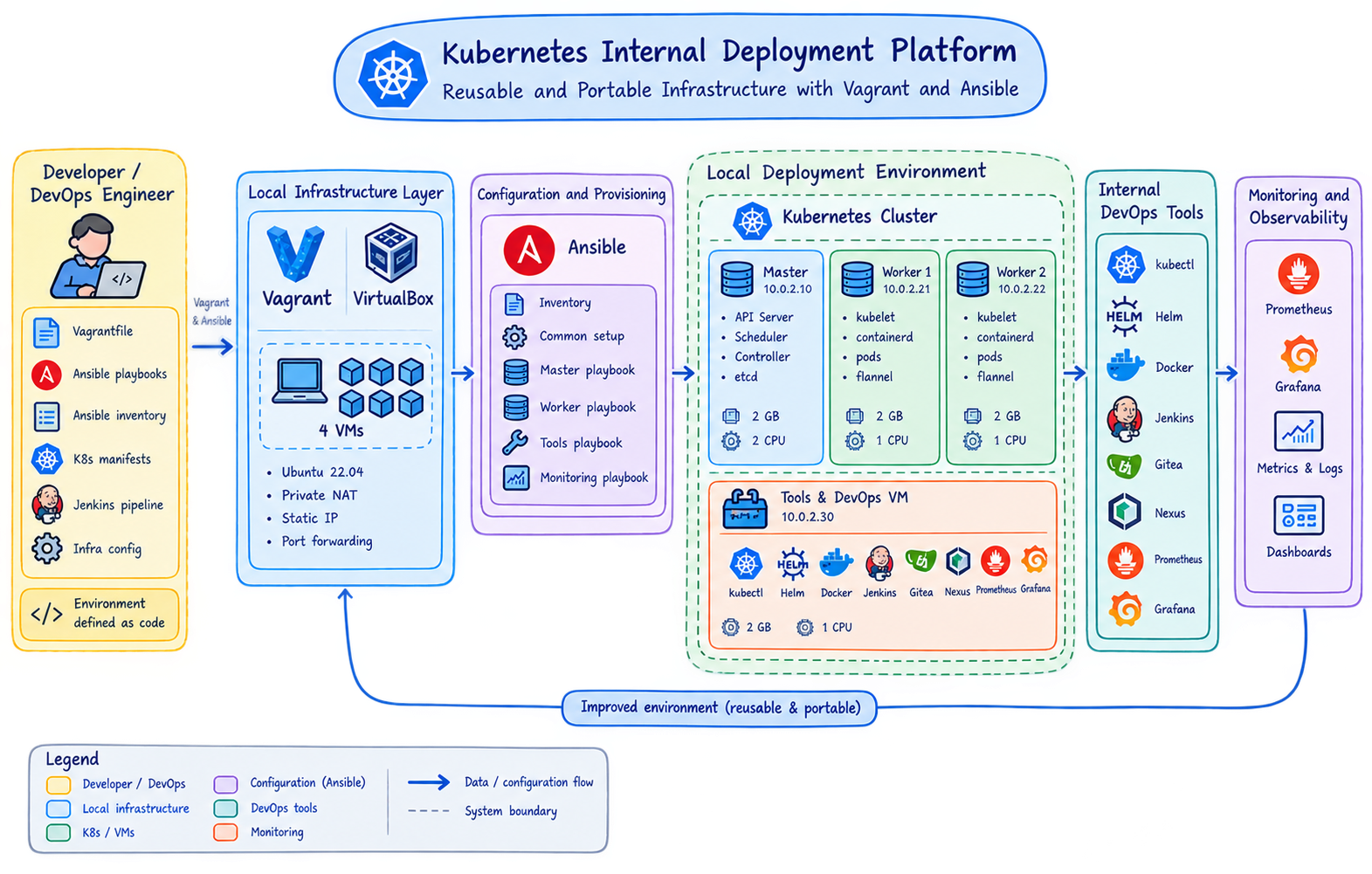
The environment contains four virtual machines:
- Master node: Runs the Kubernetes control plane and manages the cluster.
- Worker 1 and Worker 2: Run the containers and provide resources for workloads.
- Tools VM: Provides tools such as
kubectl, Helm, Docker, Jenkins, and monitoring utilities.
The machines communicate through a private VirtualBox network. Ansible prepares the operating systems, installs containerd and Kubernetes, initializes the master node, and joins the worker nodes to the cluster. Flannel provides networking between the Kubernetes nodes.
What I Learned
Kubernetes and Containers
Kubernetes manages containers across several machines as one cluster. The control plane receives instructions and keeps the cluster in the desired state. It decides where containers should run and can restart them when there is a problem. Worker nodes run the containers, which are grouped into pods.
This project helped me understand the relationship between containers, pods, nodes, services, and the control plane. I also learned how containerd works as a container runtime and how Flannel allows the nodes to communicate with each other. Building the cluster locally gave me a better understanding of how a Kubernetes environment can support internal deployment and development.
Jenkins and CI/CD
I learned how Jenkins can run inside Kubernetes and support a CI/CD process. Jenkins can take code from a repository, build the required container images, and deploy resources to the cluster. This connects code changes with automated delivery and reduces the need for manual deployment steps.
Working with Jenkins helped me understand how a pipeline is organized and how Kubernetes can provide an environment for automation tools. I also learned that CI/CD is not only about building software. It also requires reliable infrastructure, clear configuration, and a way to monitor the deployment process.
I also used Gitea as an internal Git service to store and manage project code. Nexus was used as an internal artifact and Docker image registry. Together, Gitea, Jenkins, and Nexus form a simple internal workflow for storing code, building images, and making them available for deployment.
NFS Storage
I learned how NFS provides shared storage for the cluster. With NFS, data can be stored on a shared server and accessed by workloads running on different worker nodes. This is useful when a pod is restarted or moved because the data is not limited to one machine.
This helped me understand the difference between temporary container storage and persistent storage. I also learned why storage is an important part of Kubernetes deployment, especially when an application needs to keep data after a pod is replaced.
Monitoring and Observability
The project also introduced me to monitoring and observability with Prometheus and Grafana. Prometheus collects metrics from the cluster and its services, such as resource usage and system health. Grafana uses these metrics to create dashboards that make the state of the environment easier to understand.
I learned that monitoring helps show what is happening, while observability helps us understand why something is happening. Using these tools makes it easier to notice problems, follow the health of the cluster, and support future debugging.
Main Technologies
- Vagrant and VirtualBox for virtual machines
- Ansible for infrastructure automation
- Kubernetes and kubeadm for cluster management
- containerd for running containers
- Flannel for cluster networking
- Jenkins for CI/CD automation
- Gitea for internal Git repositories
- Nexus for artifacts and Docker images
- NFS for shared persistent storage
- Prometheus and Grafana for monitoring and observability
Final Reflection
This project improved my understanding of DevOps and Infrastructure as Code. I learned how to build a complete Kubernetes environment instead of configuring isolated tools separately. The most important lesson was that reusable infrastructure makes development and deployment more consistent. It also makes it easier for other people to recreate the same environment and work with it.
Links
- Repository: GitHub
- Kubernetes Documentation: kubernetes.io/docs
- Jenkins Documentation: jenkins.io/doc
- Prometheus Documentation: prometheus.io/docs
- Grafana Documentation: grafana.com/docs