AgentTracer is a local-first visual debugger for AI agents — trace your LLM runs, inspect spans step-by-step, and understand agent behavior during development.
Why AgentTracer?
Existing observability tools (Langfuse, LangSmith) are built for production monitoring: dashboards, metrics, team collaboration. They’re heavy, require external services, and aren’t optimized for rapid local iteration.
AgentTracer is different:
- Local-first — SQLite database, no external services, works entirely offline
- Developer-focused — built for understanding agents during development, not monitoring in prod
- Step-by-step — interactive tree view of every span, tool call, prompt, and response
- Minimal setup — start backend, run traced agent, open UI
- Python SDK — OpenTelemetry-based decorators for agent runs and nested spans
Why I Built AgentTracer
I built AgentTracer to get practical experience with observability for AI agents. When an agent gives an unexpected answer or makes a wrong tool call, it is difficult to understand what happened by looking only at the final result. I wanted to create a local tool that shows the agent’s work step by step, including its spans, events, tool calls, and responses.
I also wanted to learn how OpenTelemetry can be used in a real project. Instead of only reading about tracing, I wanted to create spans, export them, store them, and display them in a visual interface. I explored Protocol Buffers for the same reason: to understand how structured data can be defined and exchanged between different parts of a system.
Architecture
What I Learned
OpenTelemetry and Tracing
I learned that a span represents one unit of work, such as an agent run, a step, a tool call, or an LLM call. A span has a start time, an end time, a name, and a type. I can add attributes to describe the work, such as the model name or temperature, and I can add events for important moments such as an input, output, or error.
I also learned how parent-child relationships work in tracing. A complete agent run can contain many smaller operations. When each operation is connected to its parent span, the spans form a tree that makes the agent’s behavior easier to follow and debug.
How Trace Data Moves Through AgentTracer
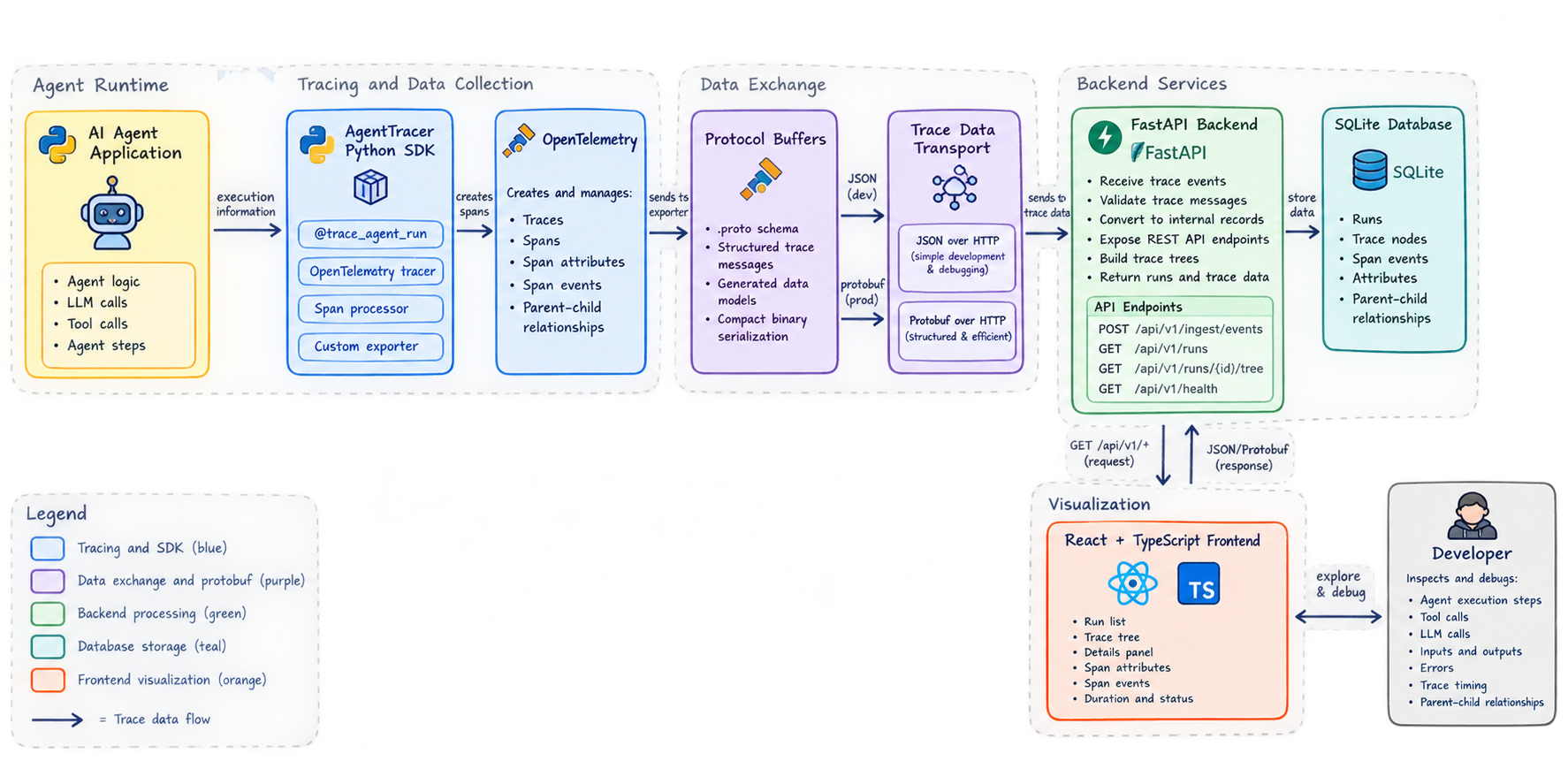
The AgentTracer SDK uses the @trace_agent_run decorator to create a root span around an agent function. Nested operations can be recorded with @trace_span, while record_input() and record_output() add useful events to the current span. OpenTelemetry manages the span context, and the RetryBatchSpanProcessor collects completed spans and retries failed exports.
The custom exporter converts the OpenTelemetry spans into AgentTracer events and sends them to the FastAPI backend through the POST /api/v1/ingest/events endpoint. The backend is organized using clean architecture: application services handle ingestion and run queries, repository classes manage persistence, and async SQLAlchemy stores the data in SQLite. The React frontend requests this data through the REST API and displays the runs as an interactive trace tree. This helped me understand the complete path of observability data, from the agent code to the SDK, backend, database, and user interface.
Backend and Frontend Architecture
I also learned how to separate a backend into clear layers. The domain layer contains the main entities and rules, the application layer contains services such as IngestService and RunService, and the infrastructure layer contains the SQLAlchemy models and repositories. FastAPI connects these layers through a dependency-injected application factory.
On the frontend, I built a three-panel React interface. The RunList displays previous agent runs, the TraceTree shows parent-child span relationships, and the DetailsPanel displays timing information, attributes, and events for the selected span.
Protocol Buffers
I explored Protocol Buffers, also called protobuf, to learn how structured data contracts are created with .proto files. A .proto file defines messages and their fields in a clear format. Code can then be generated for different programming languages, which helps services communicate using the same data structure.
The current AgentTracer ingestion endpoint uses JSON over HTTP because it is simple to inspect and easy to use during development. Protocol Buffers are different because they use a defined schema and a compact binary format. This can reduce message size and improve communication efficiency, especially when a system sends many trace events. Comparing JSON with protobuf helped me understand the trade-off between easy debugging and efficient, strongly structured data exchange. As a next step, I plan to add protobuf support to AgentTracer so the SDK and backend can exchange trace data using protobuf messages. This will allow the system to work with both JSON and protobuf, depending on the use case.
SDK Usage
Decorator (simplest)
from agent_trace_sdk import trace_agent_run
@trace_agent_run(name="research_agent")def research(query: str) -> str: return run_agent(query)
research("What is Python?")Nested Spans and Events
from agent_trace_sdk import record_input, record_output, trace_agent_run, trace_span
@trace_agent_run(name="research_agent")def research(query: str) -> str: record_input(query)
@trace_span(name="search_web", span_type="tool_call") def search(value: str) -> str: return f"results for {value}"
result = search(query) record_output(result) return resultWhat Gets Collected
- Spans — each unit of work with start/end timestamps
- Span types —
agent_run,step,tool_call,llm_call - Attributes — key-value pairs on spans
- Events — custom events like
input,output,error - Parent-child relationships — nested spans form a tree
- Reliable delivery — failed exports are kept for retry by the batch processor
- Offline debugging — the console exporter can print spans without the backend
API Endpoints
| Method | Path | Description |
|---|---|---|
POST | /api/v1/ingest/events | Accept trace events from SDK |
GET | /api/v1/runs | List runs (paginated) |
GET | /api/v1/runs/{id} | Get run details |
GET | /api/v1/runs/{id}/tree | Get trace tree |
GET | /api/v1/health | Health check |
Roadmap
- Protocol Buffers transport for structured trace messages
- Framework integrations for LangChain, LlamaIndex, and the OpenAI SDK
- Configuration through environment variables
- Typed global exception handling
- Enhanced visualization with timeline view, filtering, and search
- Run comparison with side-by-side trace differences
- Docker setup with docker-compose
- PostgreSQL backend for larger deployments
Links
- Repository: github.com/chameauu/AgentTracer
- OpenTelemetry Documentation: opentelemetry.io/docs
- Protocol Buffers Documentation: protobuf.dev
Built for developers who want to understand their AI agents, step by step.