If you have used Docker or Kubernetes, you have almost certainly encountered names like containerd, runc, and OCI. But how do these components interact when you type docker run or nerdctl run? What actually creates the isolation on Linux?
Containers are not lightweight virtual machines—they are ordinary Linux processes isolated by kernel primitives (namespaces, cgroups, and chroot/pivot_root). To manage these primitives efficiently and reliably at scale, modern container infrastructure is split into distinct, modular layers.
In this guide, we will unpack each layer of the container stack, explore the tools used to interact with them directly, and trace what happens behind the scenes from command invocation to process execution.
The Big Picture: How the Stack Fits Together
Before diving into individual components, let’s examine the architectural hierarchy:
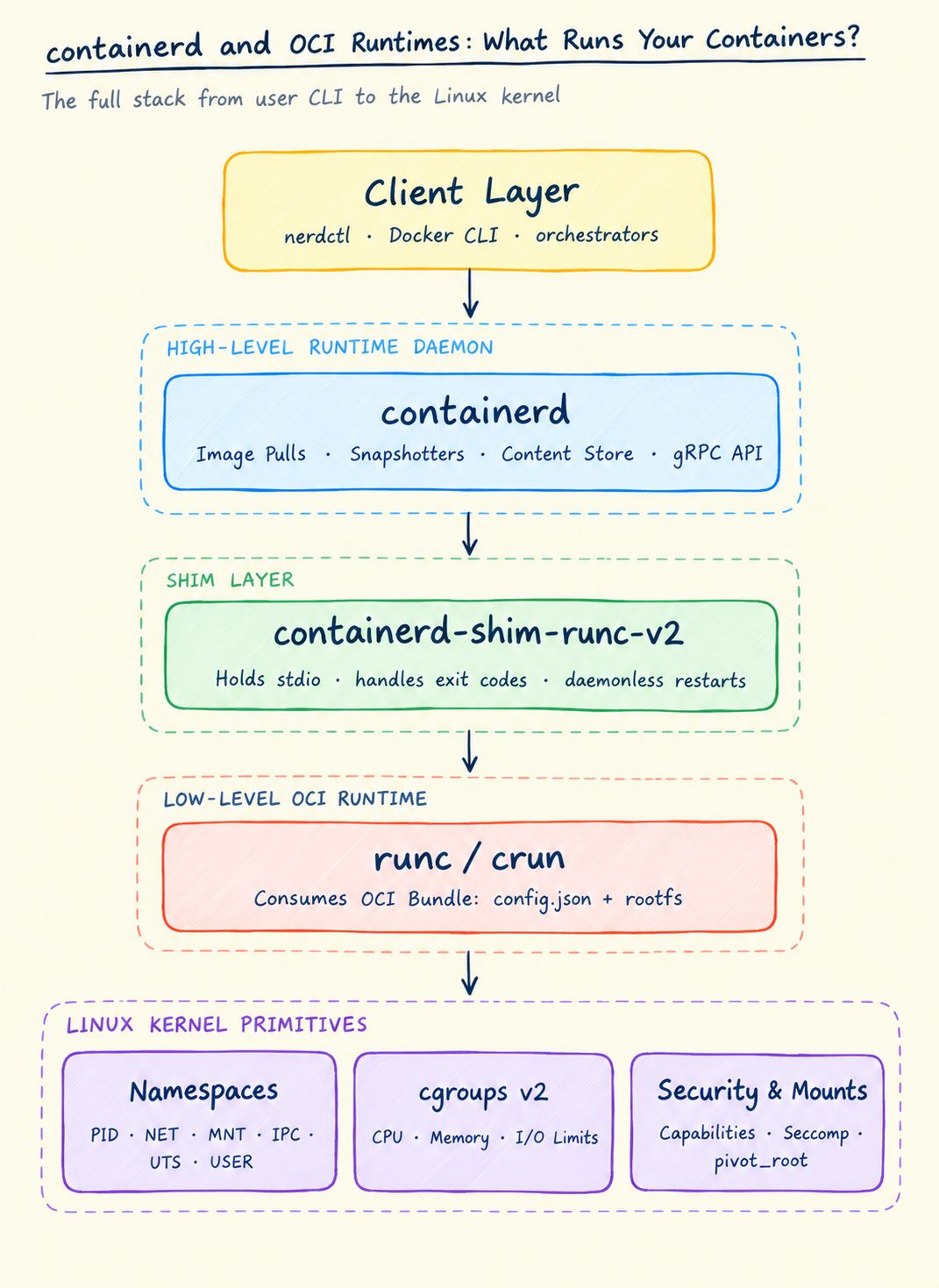
1. What is containerd?
containerd is an industry-standard container runtime daemon that manages the complete container lifecycle on a host. Originally developed by Docker Inc. in 2014, it was donated to the Cloud Native Computing Foundation (CNCF) in 2017 and is now a graduated, battle-tested project.
It is designed to be minimal, robust, and embeddable into larger orchestration systems or developer platforms like Docker.
Core Responsibilities
- Image Management: Pulls images from OCI/Docker registries, validates cryptographic digests, unpacks image layers, and manages storage snapshotters (such as
overlayfs). - Container Lifecycle Management: Creates, starts, pauses, stops, and deletes containers.
- Root Filesystem Snapshots: Prepares the union mount (
overlay2) representing the container’s writable and read-only layers. - Content Store: Manages immutable content-addressed image blobs and metadata on local storage.
- gRPC API: Exposes a high-performance gRPC interface over a UNIX domain socket (
/run/containerd/containerd.sock).
2. How to Interact with containerd
Because containerd is a daemon designed primarily for programmatic consumption, choosing the right CLI tool depends on whether you are debugging the runtime internals or running general-purpose containers.
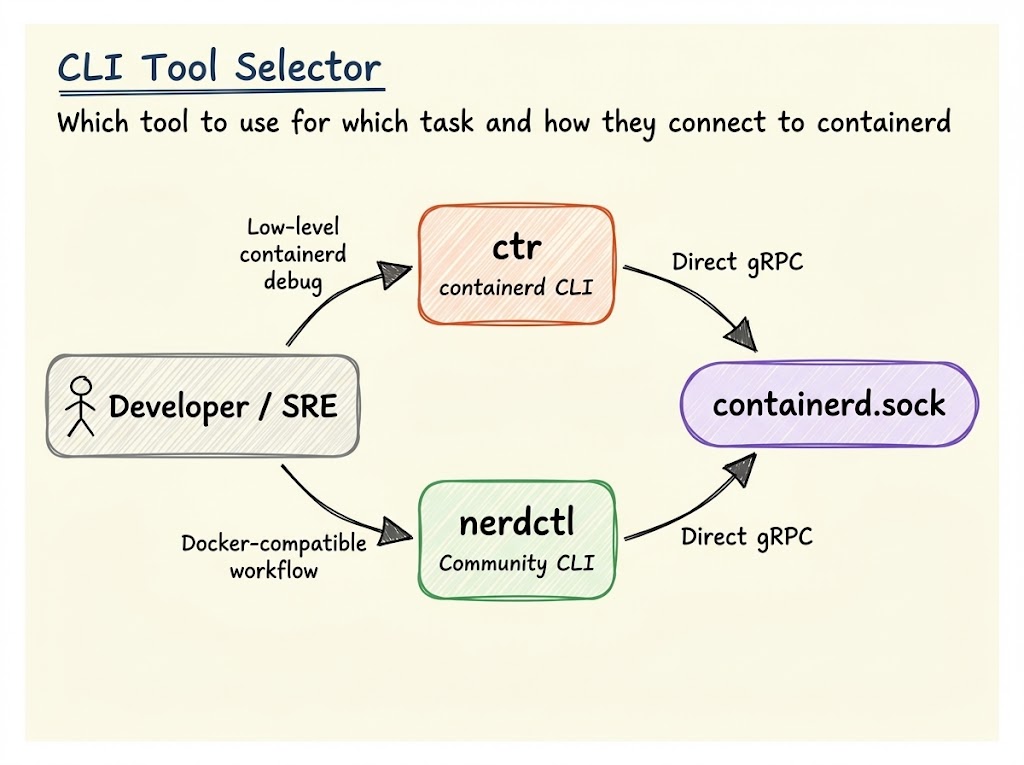
1. ctr — Native containerd Debugging Tool
ctr is bundled directly with the containerd binary release. It speaks containerd’s native internal gRPC API directly. It was built specifically for containerd developers to test features, not as a general-purpose Docker replacement.
One crucial concept in containerd is namespaces (distinct from Linux kernel namespaces). containerd isolates images and containers into logical groups:
moby: used by Dockerk8s.io: used by Kubernetesdefault: the default namespace when usingctr
# Pull an image into the default namespacesudo ctr images pull docker.io/library/alpine:latest
# List images in the default namespacesudo ctr images ls
# Run an interactive container with host networkingsudo ctr run --rm -t --net-host docker.io/library/alpine:latest debug-box sh
# List active container tasks (processes)sudo ctr tasks ls2. nerdctl — Docker-Compatible CLI for containerd
nerdctl is a community project maintained under the containerd GitHub organization. It aims to provide the exact same user experience and CLI syntax as docker, but talks directly to containerd.
It supports:
- Full
docker run,docker ps,docker execsyntax - Building images via BuildKit (
nerdctl build) - Multi-container applications via
nerdctl compose - Inspecting and managing containers across custom namespaces
# Run an ephemeral containersudo nerdctl run -it --rm alpine sh
# Run a detached Nginx server with port mappingsudo nerdctl run -d --name web -p 8080:80 nginx:alpine
# Build an image using BuildKitsudo nerdctl build -t my-microservice:v1 .
# Inspect running containerssudo nerdctl ps3. What is an OCI Runtime?
While containerd manages high-level concerns like pulling images and mounting filesystems, it does not create container processes itself. That responsibility belongs to a low-level OCI runtime.
The Open Container Initiative (OCI) is an open governance body that standardizes two primary specifications:
- OCI Image Specification: How container images are packaged, tarred, and indexed via manifest layers.
- OCI Runtime Specification: How a container is unpacked into an OCI Bundle on disk and executed by the operating system.
What is an OCI Bundle?
An OCI runtime does not know anything about registries, tags, or tar archives. It only expects a directory on the local filesystem called an OCI Bundle, which contains two things:
rootfs/: A directory containing the complete unpacked filesystem of the container (often assembled via anoverlayfsmount).config.json: A standard JSON file describing:- Command and arguments to execute (
process.args) - Environment variables (
process.env) - Linux namespaces to create (
pid,network,mount,ipc,uts,user) - Resource limits (cgroups for memory, CPU, pids)
- Capabilities to drop or retain (e.g.
CAP_NET_RAW,CAP_SYS_ADMIN) - Mount points (
/proc,/sys,/dev/pts)
- Command and arguments to execute (
{ "ociVersion": "1.0.2", "process": { "terminal": false, "user": { "uid": 0, "gid": 0 }, "args": ["nginx", "-g", "daemon off;"], "env": ["PATH=/usr/local/sbin:/usr/local/bin:/usr/sbin:/usr/bin:/sbin:/bin"] }, "root": { "path": "rootfs", "readonly": true }, "linux": { "namespaces": [ { "type": "pid" }, { "type": "network" }, { "type": "ipc" }, { "type": "uts" }, { "type": "mount" } ], "resources": { "memory": { "limit": 536870912 } } }}runc: The Reference OCI Runtime
runc is the universal reference implementation of the OCI runtime specification. Written in Go with minimal C bindings (libcontainer), it is a small binary (~10 MB) whose sole job is to turn an OCI bundle into an isolated process.
When runc executes:
- Reads
config.json: Validates security configurations, paths, and resource limits. - Calls
clone()with namespace flags: Creates a child process isolated in new Linux namespaces (CLONE_NEWPID,CLONE_NEWNET,CLONE_NEWNS, etc.). - Applies cgroups: Adds the new process PID to the appropriate cgroup directory (e.g.,
/sys/fs/cgroup/memory/...) to enforce memory and CPU limits. - Mounts rootfs and pivots root: Mounts the bundle’s
rootfsand callspivot_root(orchroot) to trap the process inside its own filesystem tree. - Drops Linux Capabilities: Drops dangerous capabilities (
CAP_SYS_ADMIN,CAP_SYS_RAWIO) according to the security profile. - Calls
execve(): Overwrites the current process memory with the target container entrypoint (e.g.,nginx). The target binary is now running as PID 1 inside the container’s PID namespace. - Exits: Once the target process is running,
runcterminates!
Why is the containerd-shim Necessary?
If runc exits immediately after launching the container process, who keeps track of the container?
This is where the containerd-shim (specifically containerd-shim-runc-v2) plays a critical role. For every container, containerd launches a tiny, long-lived shim process.
The shim serves three vital functions:
- Daemonless Containers: It acts as the subreaper and parent of the container process. If
containerdcrashes or restarts during an upgrade, running containers do not terminate. - I/O Handling: It holds open the standard file descriptors (
stdin,stdout,stderr) and FIFO pipes, preventing them from blocking or closing when containerd restarts. - Exit Code Propagation: When the container process finally exits, the shim collects the exit status code and informs containerd over an internal RPC channel.
4. Putting It All Together: The Lifecycle of a Container
Let’s trace the complete journey when you run a container:
nerdctl run -d --name web nginx- Client Request: The client tool (
nerdctlor Docker CLI) sends a container creation request to containerd via the gRPC socket (containerd.sock). - Image Preparation: containerd checks its local content store. If the image is missing, it pulls the OCI image from the registry, verifies hashes, and unpacks the layers into its storage snapshotter (e.g.,
overlayfs). - Bundle Creation: containerd creates the OCI bundle directory containing
rootfs/(the stacked overlay filesystem) andconfig.json(the process arguments, environment variables, namespace definitions, and resource limits). - Shim Launch: containerd spawns
containerd-shim-runc-v2for this container instance. - Process Spawning (
runc): The shim invokesrunc createandrunc start.runcconfigures Linux kernel namespaces, places the process into the appropriate cgroups, executespivot_root, drops Linux capabilities, and callsexecve()to run Nginx. - Handoff & Monitoring:
runcexits cleanly. The shim remains alive as the container’s parent process, capturing logs (stdout/stderr), maintaining pipes, and awaiting termination signals or exit codes.
Summary Cheat Sheet
| Component | Layer | Purpose | Key Example / Tool |
|---|---|---|---|
| containerd | High-level runtime daemon | Manages images, snapshots, content stores, and container lifecycles | containerd.sock, ctr |
| nerdctl | General-purpose CLI | Docker-compatible CLI talking directly to containerd | nerdctl run -d nginx |
| ctr | Internal debug CLI | Low-level debugging CLI bundled with containerd | sudo ctr images ls |
| containerd-shim | Process monitor | Decouples containers from daemon; persists stdio and exit codes | containerd-shim-runc-v2 |
| runc | Low-level OCI runtime | Reads OCI bundle (config.json + rootfs) and calls clone() | runc (OCI reference) |
Understanding this separation of concerns makes diagnosing container issues straightforward:
- If images fail to pull or layers won’t mount check containerd and snapshotters.
- If a container crashes on startup with permission or syscall errors inspect runc and OCI
config.jsoncapabilities. - If a container process disappears or exits without logs inspect the shim and host cgroup OOM logs.